> ## Documentation Index
> Fetch the complete documentation index at: https://docs.valkyrieapp.azumo.com/llms.txt
> Use this file to discover all available pages before exploring further.
# Endpoints
> Deploy, operate, and share the running models you call through the API.
The **Endpoints** screen lists your running models: "Running models you can call.
Each one bills only while it is running." From here you deploy base models, open an
endpoint to manage it, and reach [Aliases](/guides/aliases).
 ## The endpoints list
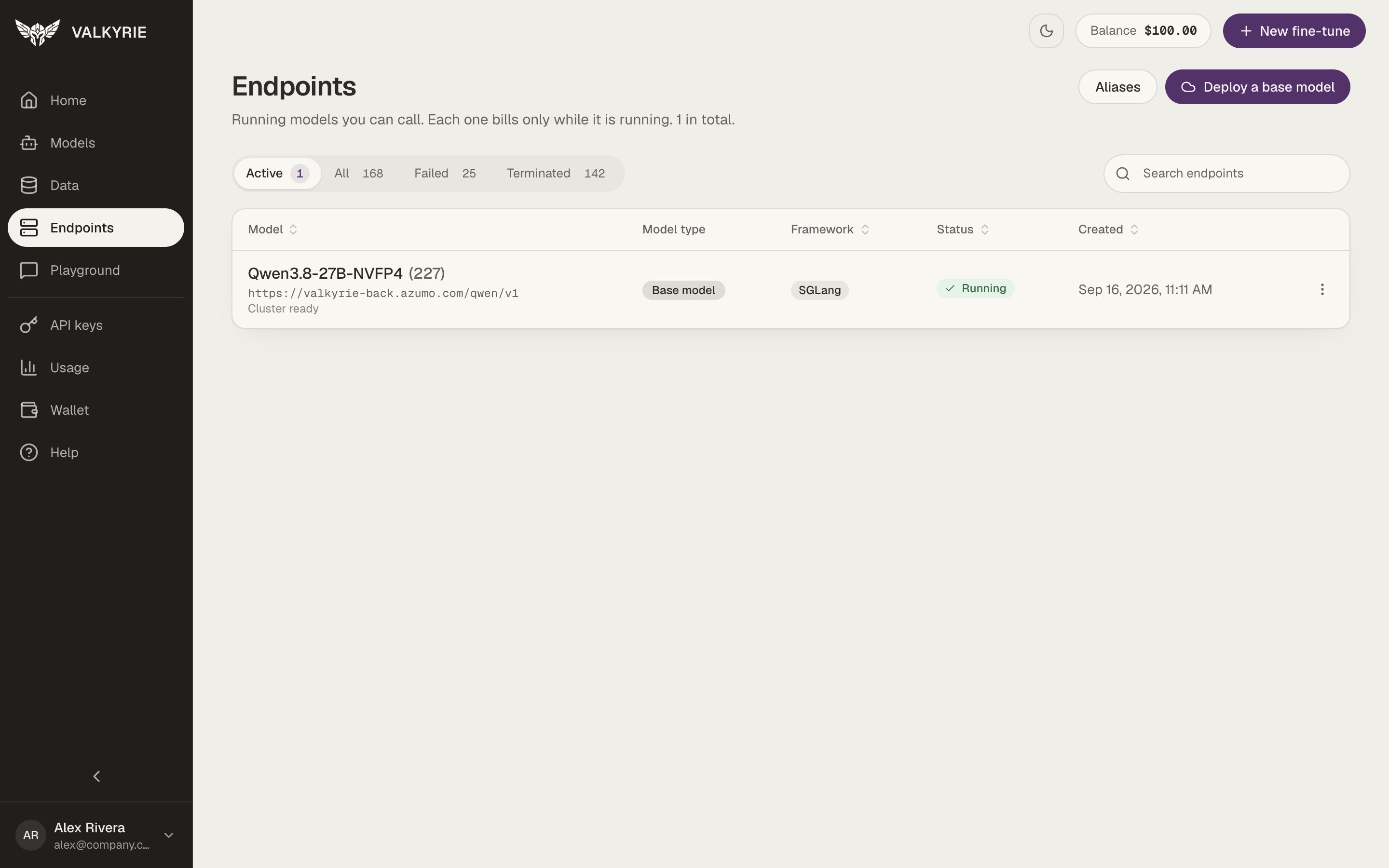
Tabs filter by **Active**, **All**, **Failed**, and **Terminated**, each with a
count. Search by name to find an endpoint across every page, and click a column
header to sort your whole list. Each row shows:
| Column | What it shows |
| - | - |
| **Model** | The model name and its endpoint URL |
| **Model type** | A **Base model** or **Fine-tuned** pill |
| **Framework** | The serving engine |
| **Status** | Where the endpoint is, see below |
| **Created** | When it was deployed |
The buttons at the top right open **Aliases** and **Deploy a base model**.
## Deployment stages
An endpoint is only ready to use once it reaches **Running**. While it starts, it
passes through:
```
Queued → Provisioning → Preparing → Initializing → Health check → Running
```
**Preparing** means the machine is up and the runtime and model files are being
set up. The screen shows this progression live, so you can see exactly where a
starting endpoint is.
Large models can take a while to start. If an endpoint is still starting after 25
minutes, the dashboard shows **Taking longer than usual**. If the machine never
becomes reachable, Valkyrie stops it automatically about 20 minutes after it comes
up, with an error that explains why, so you are not billed for a machine you
cannot use.
## Endpoint detail
Click an endpoint to open it. The page has three tabs: **Overview**, **Webhooks**,
and **Access**.
## The endpoints list
Tabs filter by **Active**, **All**, **Failed**, and **Terminated**, each with a
count. Search by name to find an endpoint across every page, and click a column
header to sort your whole list. Each row shows:
| Column | What it shows |
| - | - |
| **Model** | The model name and its endpoint URL |
| **Model type** | A **Base model** or **Fine-tuned** pill |
| **Framework** | The serving engine |
| **Status** | Where the endpoint is, see below |
| **Created** | When it was deployed |
The buttons at the top right open **Aliases** and **Deploy a base model**.
## Deployment stages
An endpoint is only ready to use once it reaches **Running**. While it starts, it
passes through:
```
Queued → Provisioning → Preparing → Initializing → Health check → Running
```
**Preparing** means the machine is up and the runtime and model files are being
set up. The screen shows this progression live, so you can see exactly where a
starting endpoint is.
Large models can take a while to start. If an endpoint is still starting after 25
minutes, the dashboard shows **Taking longer than usual**. If the machine never
becomes reachable, Valkyrie stops it automatically about 20 minutes after it comes
up, with an error that explains why, so you are not billed for a machine you
cannot use.
## Endpoint detail
Click an endpoint to open it. The page has three tabs: **Overview**, **Webhooks**,
and **Access**.
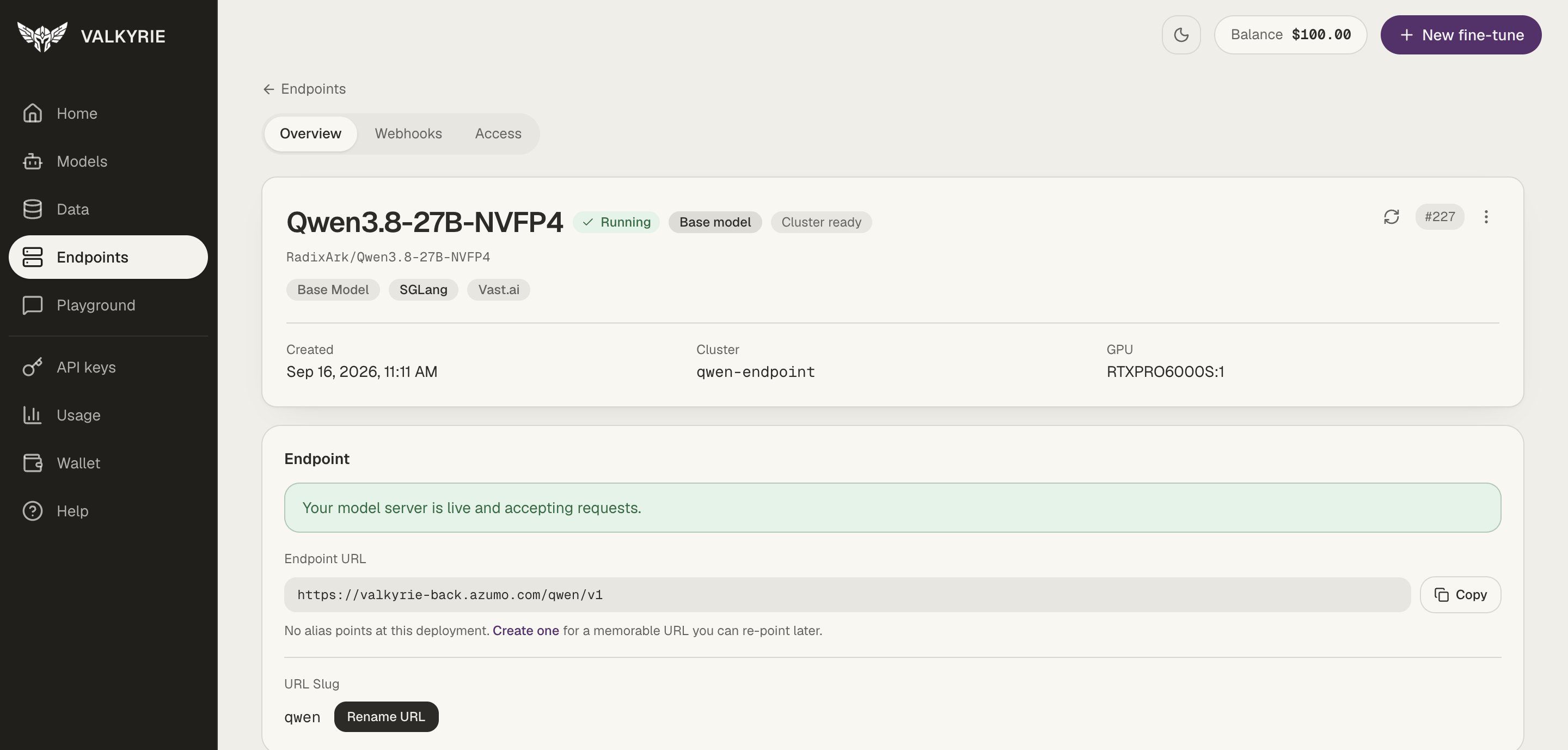 **Overview** shows the status pill and a **Base model** or **Fine-tuned** pill,
when the endpoint was created, and the GPU it runs on. The **Endpoint** section has:
* The **Endpoint URL** with a **Copy** button.
* The [alias](/guides/aliases) pointing at it, or a **Create one** link if there is
none.
* The **URL slug**, which you can change with **Rename URL**.
The actions for the endpoint are in its menu.
### Operate an endpoint
| Action | What it does |
| - | - |
| **Stop / Resume** | Release the GPU when idle; bring it back on demand |
| **Restart** | Restart the serving process without redeploying |
| **Health** | Check that the model is actually serving requests |
| **Schedule** | Start and stop automatically on a cron schedule |
| **Auto-restart** | Recover the service if it becomes unhealthy |
A running endpoint holds a GPU and costs money even when idle. Use stop/resume or
a schedule to control spend, see [Wallet & billing](/guides/wallet-billing).
### Share an endpoint
On the **Access** tab you can grant teammates access by email. The owner can see
who has access and which keys each person holds, and can revoke access, which
invalidates the keys tied to that grant. Endpoints shared with you are marked in the
list and when you create a key.
## Deploy a base model
A base model is served as it is, with no fine-tune. Open **Deploy a base model**
from Endpoints, from Home ("No fine-tune needed? Deploy a base model as it is"), or
from the Models list.
**Overview** shows the status pill and a **Base model** or **Fine-tuned** pill,
when the endpoint was created, and the GPU it runs on. The **Endpoint** section has:
* The **Endpoint URL** with a **Copy** button.
* The [alias](/guides/aliases) pointing at it, or a **Create one** link if there is
none.
* The **URL slug**, which you can change with **Rename URL**.
The actions for the endpoint are in its menu.
### Operate an endpoint
| Action | What it does |
| - | - |
| **Stop / Resume** | Release the GPU when idle; bring it back on demand |
| **Restart** | Restart the serving process without redeploying |
| **Health** | Check that the model is actually serving requests |
| **Schedule** | Start and stop automatically on a cron schedule |
| **Auto-restart** | Recover the service if it becomes unhealthy |
A running endpoint holds a GPU and costs money even when idle. Use stop/resume or
a schedule to control spend, see [Wallet & billing](/guides/wallet-billing).
### Share an endpoint
On the **Access** tab you can grant teammates access by email. The owner can see
who has access and which keys each person holds, and can revoke access, which
invalidates the keys tied to that grant. Endpoints shared with you are marked in the
list and when you create a key.
## Deploy a base model
A base model is served as it is, with no fine-tune. Open **Deploy a base model**
from Endpoints, from Home ("No fine-tune needed? Deploy a base model as it is"), or
from the Models list.
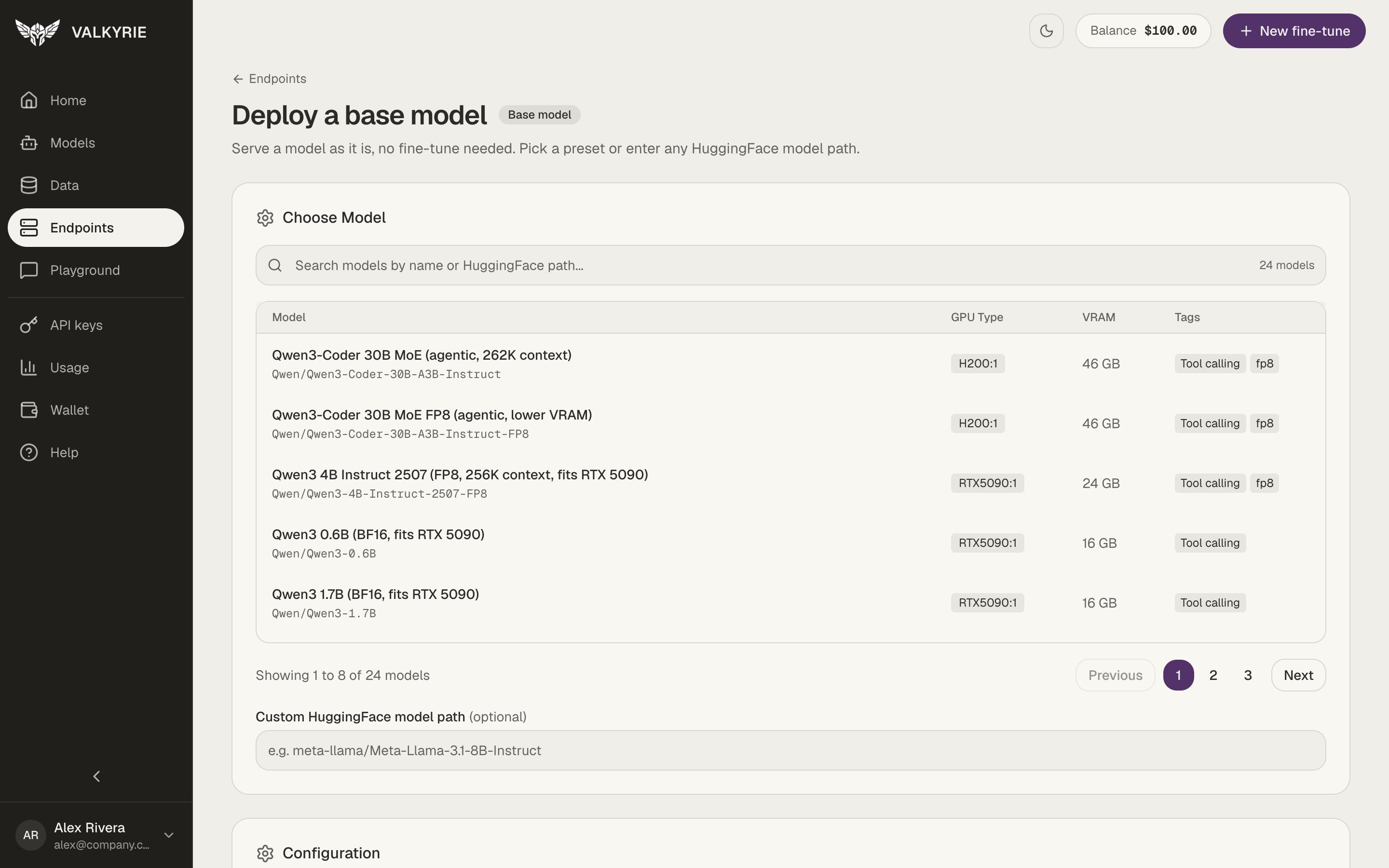 Search the presets by name or Hugging Face path. Each preset shows the GPU type
it needs, its memory, and tags such as tool calling. Or enter any **Custom
HuggingFace model path**.
Review the configuration, add an optional alias, and deploy. You land on the new
endpoint's page, where you can follow its stages to **Running**.
## Deploy a fine-tuned version
When a version on [Models](/dashboard/models) has completed, click **Deploy** to
open its deploy page.
Under **Serving settings**, choose the **Hardware** from a GPU list that shows
the price per hour and the memory per card. Choose the **Engine**: vLLM
(recommended) or Ollama. The **Advanced** section lets you set the context
length, memory use, and an optional cluster name. Traffic-based run tiers ("How
much traffic?") are marked **Coming soon**.
The **Summary** shows the model, hardware, engine, and **Cost while running**
per hour. Billed from your wallet while the endpoint runs. Stop it any time from
its page.
Click **Deploy endpoint**. You land on the new endpoint's page.
Once a version is deployed, its page on Models links to the running endpoint
instead of showing **Deploy**.
## Call the endpoint
A ready endpoint exposes an OpenAI-compatible API at its URL
(`/{deployment_slug}/v1/...`). Attach an [alias](/guides/aliases) for a memorable
URL, try it first in the [Playground](/dashboard/playground), and see
[Run inference](/guides/inference) for request examples.
A fine-tuned endpoint serves its model as `fine-tuned-`. You do not need
to match that name exactly: Valkyrie routes requests sent to the endpoint's URL to
your fine-tuned model whatever model name the client sends.
This documentation is built and hosted on [Mintlify](https://mintlify.com), a developer documentation platform.
Search the presets by name or Hugging Face path. Each preset shows the GPU type
it needs, its memory, and tags such as tool calling. Or enter any **Custom
HuggingFace model path**.
Review the configuration, add an optional alias, and deploy. You land on the new
endpoint's page, where you can follow its stages to **Running**.
## Deploy a fine-tuned version
When a version on [Models](/dashboard/models) has completed, click **Deploy** to
open its deploy page.
Under **Serving settings**, choose the **Hardware** from a GPU list that shows
the price per hour and the memory per card. Choose the **Engine**: vLLM
(recommended) or Ollama. The **Advanced** section lets you set the context
length, memory use, and an optional cluster name. Traffic-based run tiers ("How
much traffic?") are marked **Coming soon**.
The **Summary** shows the model, hardware, engine, and **Cost while running**
per hour. Billed from your wallet while the endpoint runs. Stop it any time from
its page.
Click **Deploy endpoint**. You land on the new endpoint's page.
Once a version is deployed, its page on Models links to the running endpoint
instead of showing **Deploy**.
## Call the endpoint
A ready endpoint exposes an OpenAI-compatible API at its URL
(`/{deployment_slug}/v1/...`). Attach an [alias](/guides/aliases) for a memorable
URL, try it first in the [Playground](/dashboard/playground), and see
[Run inference](/guides/inference) for request examples.
A fine-tuned endpoint serves its model as `fine-tuned-`. You do not need
to match that name exactly: Valkyrie routes requests sent to the endpoint's URL to
your fine-tuned model whatever model name the client sends.
This documentation is built and hosted on [Mintlify](https://mintlify.com), a developer documentation platform.