
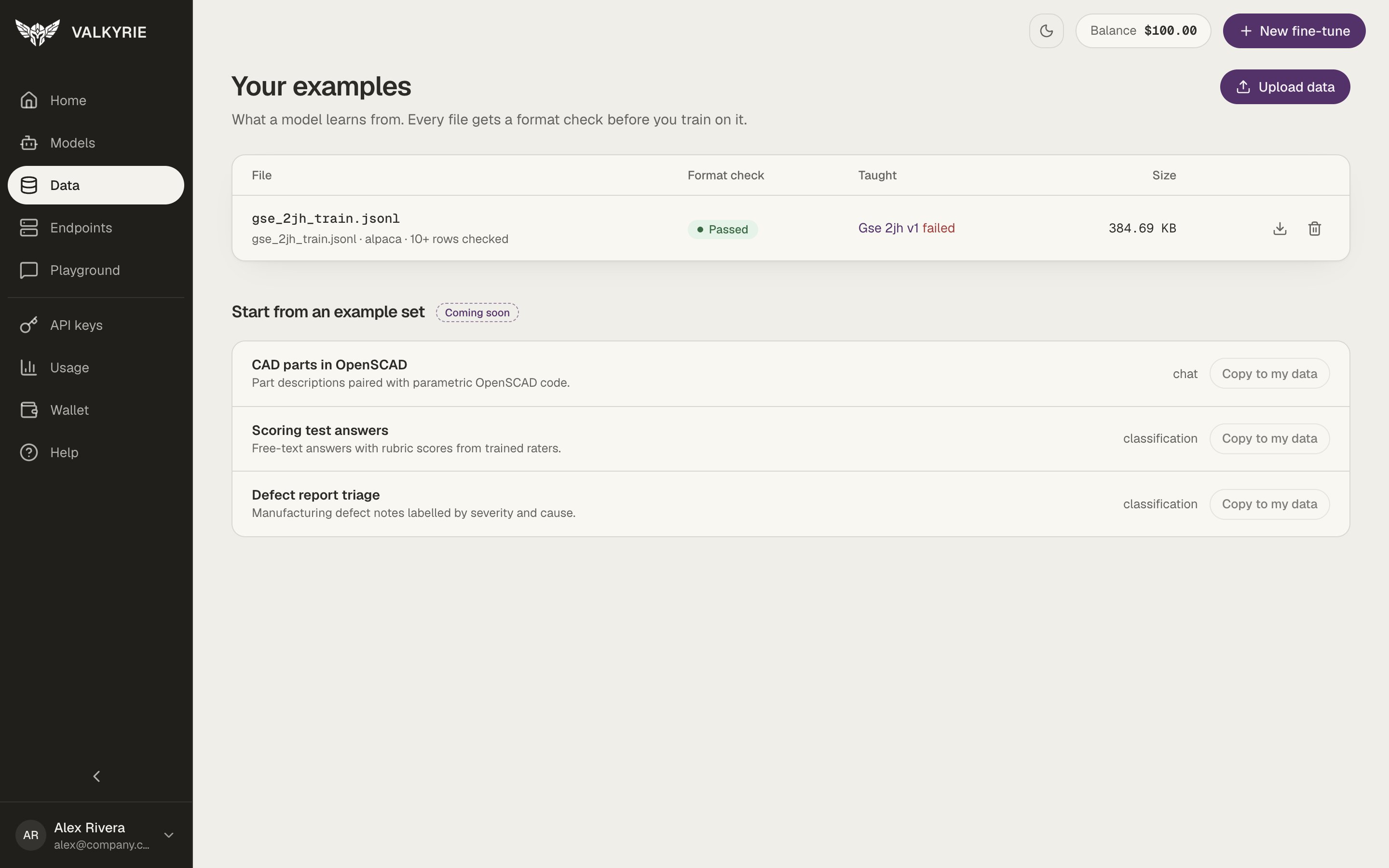
The Data screen: each file with its format check and what it taught.
Upload a dataset
1
Open Data
In the dashboard, go to Data and click Upload data.
2
Upload your file
Drop your file or click Choose file (JSONL, JSON, CSV, Parquet, or text, up
to 2 GB), and optionally give it a name. Valkyrie stores the file for you and
checks its format as soon as it lands.
3
Check the format
The dataset’s page opens with the Format check result, the detected format,
and the columns it found. Fix the file and upload it again if the check reports
Needs fixing.
4
Train on it
Click Fine-tune with these to start a fine-tune with
this file selected, or pick it under Your examples in New fine-tune.
Formatting your data
Fine-tuning expects structured conversational or instruction data. A common, portable shape is JSON Lines (.jsonl), one training example per line, for example
a chat-style record:
customer-sentiment.jsonl or customer-sentiment.csv, to try
the whole flow.
Managing datasets
From the Data screen (or via the MCP tools) you can:- List your datasets, check their format, and see which model versions each one taught.
- Download a dataset with a temporary signed URL.
- Delete a dataset you no longer need.
Datasets are stored in object storage. Deleting a dataset does not affect models
you’ve already trained from it.